
You plug your phone into a Windows PC and nothing happens, or it charges but never shows up in File Explorer, or ADB says no devices found. In most of these cases the fix is the right Android USB driver, plus a couple of settings on the phone that are easy to miss.
This guide explains when you actually need an Android USB driver, which one to install for Pixel, Samsung and other brands, the exact Device Manager steps for Windows 11 and 10, and how to fix a phone that still is not detected.
Table of Contents
- Do You Need an Android USB Driver?
- Step 1: Check the Cable and USB Port
- Step 2: Set the Phone’s USB Mode
- Step 3: Download the Right Android USB Driver
- Step 4: Install the Android USB Driver on Windows 11
- Step 5: Enable USB Debugging and Test ADB
- Fix an Android Phone That Windows Still Won’t Detect
- MTP, ADB and Fastboot: What Each Connection Does
- Install the Google USB Driver Through Android Studio
- Skip the Cable: Wireless Debugging on Android 11 and Later
- Mac, Linux and ChromeOS Notes
- Android USB Driver Safety Tips
- Frequently Asked Questions
Do You Need an Android USB Driver?
Windows already includes drivers for basic phone connections, so many people never install anything. What you need depends on what you are doing.
| Task | Extra driver needed? | Notes |
|---|---|---|
| Charging | No | Works with any cable |
| Copying photos and files | Usually no | Windows uses its built-in MTP driver |
| ADB and USB debugging | Often yes | Needs an ADB-capable Android USB driver |
| Fastboot and bootloader tools | Often yes | Same driver package usually covers it |
| Manufacturer PC software | Yes | Maker’s suite typically installs its own driver |
Google’s documentation notes that developers on Windows need an appropriate USB driver to connect a device for testing, while Mac and Linux computers generally do not. So if you only use macOS or Linux, you can skip the Android USB driver entirely.
Step 1: Check the Cable and USB Port
Before blaming the driver, rule out hardware. It solves more “phone not detected” problems than any software fix.
- Use a data cable. Many cheap cables charge only and cannot carry data. The cable that came with the phone is the safest choice.
- Plug directly into the computer, not a hub, monitor or keyboard port.
- Try another USB port, ideally on the back of a desktop PC.
- Clean the phone’s port gently with a wooden toothpick if the plug feels loose.
Step 2: Set the Phone’s USB Mode
Android defaults to charging only for privacy. When you connect the cable:
- Unlock the phone.
- Swipe down and tap the Charging this device via USB notification.
- Choose File transfer (sometimes called Transferring files or MTP).
If Windows now shows the phone in File Explorer, the built-in driver is working and you only need a dedicated Android USB driver for ADB or developer tools.
Step 3: Download the Right Android USB Driver
There is no single universal Android USB driver. Pick the one that matches your phone’s manufacturer.
Google Pixel: Google USB Driver
Pixel phones use the Google USB Driver. Download it as a ZIP from Google’s Android developer website, or install it in Android Studio through the SDK Manager under SDK Tools. Once installed through Android Studio, the files are in the SDK folder under extras\google\usb_driver.
Samsung Galaxy: Samsung Android USB Driver
Samsung publishes its own Android USB driver for Windows on the Samsung Developers website. Run the installer, restart the computer, then reconnect the phone. It supports Galaxy phones and tablets for ADB and Samsung’s tools.
If you installed Samsung Smart Switch for PC to back up or move data, it may already have added a compatible driver. Check Device Manager before installing a second package, because two overlapping driver versions can make the connection less reliable rather than more. When in doubt, remove the older one and keep the latest version from Samsung’s site.
Other brands
Motorola, OnePlus, Xiaomi, Sony and other manufacturers provide drivers on their official support sites, often bundled with their PC companion software. Search the maker’s support page for your model and “USB driver”. Google’s OEM USB drivers page links to several manufacturer driver sites and explains the installation process.
Step 4: Install the Android USB Driver on Windows 11
Installer-based packages, like Samsung’s, set everything up automatically. For the Google USB Driver ZIP or other INF-based drivers, use Device Manager.
- Extract the driver ZIP to a folder you can find easily, such as your Documents folder.
- Connect the phone and unlock it.
- Right-click the Start button and choose Device Manager.
- Look under Portable Devices, Other devices or Universal Serial Bus devices for your phone, or an item with a yellow warning icon such as “ADB Interface”.
- Right-click it and choose Update driver.
- Select Browse my computer for drivers.
- Click Browse, choose the extracted driver folder, tick Include subfolders, and click Next.
- Approve the Windows Security prompt if one appears.
After installation, the device should appear as Android Composite ADB Interface or similar under an Android device category. That name confirms the Android USB driver is working for debugging.
Windows 10 differences
The steps are nearly identical on Windows 10. You can also open Device Manager by pressing Windows key plus X, and the option may be labelled Update driver software on older builds.
If Windows says the best driver is already installed
- Choose Update driver again, then Browse my computer for drivers.
- Select Let me pick from a list of available drivers.
- Click Have Disk, browse to the driver folder, and select the INF file, such as
android_winusb.inf. - Choose the ADB interface entry and finish the wizard.
Step 5: Enable USB Debugging and Test ADB
The Android USB driver only matters for ADB if USB debugging is on.
- On the phone, open Settings, then About phone.
- Tap Build number seven times to unlock Developer options. On Samsung, it is under Software information.
- Open Developer options and turn on USB debugging.
- Install Google’s SDK Platform-Tools on the PC and open a terminal in that folder.
- Run
adb devices. - Unlock the phone and tap Allow on the USB debugging prompt.
- Run
adb devicesagain. Your phone’s serial number followed by “device” means success.
Need ADB and Fastboot Too?
The Android USB driver lets Windows see your phone; Google’s official SDK Platform-Tools package adds the adb and fastboot commands you need for installing apps and developer tasks.
Fix an Android Phone That Windows Still Won’t Detect
| Symptom | Likely cause | Fix |
|---|---|---|
| Charges, nothing else happens | Charge-only cable or USB mode | Swap cable; select File transfer on the phone |
| Yellow warning icon in Device Manager | Missing Android USB driver | Install the Google or OEM driver as above |
| adb devices shows nothing | USB debugging off or wrong driver | Enable USB debugging; reinstall the ADB driver |
| adb devices shows unauthorized | Phone has not trusted the PC | Unlock, reconnect, tap Allow on the prompt |
| Device connects and disconnects repeatedly | Power-saving on USB port or loose cable | Try another port; disable USB selective suspend in power options |
| Works in ADB but not fastboot | Bootloader interface lacks driver | Update driver while phone is in fastboot mode |
Remove a broken driver and start fresh
If you installed several packages and nothing works, clean up first. In Device Manager, right-click the phone entry, choose Uninstall device, tick the option to remove the driver software if shown, then unplug the phone. Restart Windows, reconnect, and install one Android USB driver only.
Check Windows Update optional drivers
Windows Update sometimes offers phone drivers. Open Settings, then Windows Update, then Advanced options, then Optional updates, and look for driver updates related to your phone maker.
MTP, ADB and Fastboot: What Each Connection Does
When people talk about an Android USB driver, they often mean different things. A phone can present several USB interfaces to Windows, and each one needs driver support.
| Interface | What it is for | Where the driver comes from |
|---|---|---|
| MTP (Media Transfer Protocol) | Browsing photos, music and files in File Explorer | Built into Windows |
| PTP (Picture Transfer Protocol) | Importing photos like a camera | Built into Windows |
| ADB interface | USB debugging, app installs, logs, screen recording | Google USB Driver or OEM driver |
| Fastboot / bootloader | Flashing official system images, unlocking bootloader | Usually the same Android USB driver package |
| USB tethering (RNDIS) | Sharing the phone’s internet with the PC | Built into Windows |
That is why a phone can work perfectly for photos yet stay invisible to ADB. The MTP connection uses Windows’ own driver, while the ADB interface waits for a proper Android USB driver. In Device Manager, you may even see the phone listed twice: once as a portable device and once as an unknown ADB interface.
Install the Google USB Driver Through Android Studio
If you already use Android Studio, the SDK Manager is the tidiest way to install and update the Google driver.
- Open Android Studio and choose Tools, then SDK Manager.
- Select the SDK Tools tab.
- Tick Google USB Driver and click OK or Apply.
- Wait for the download to finish, then follow the Device Manager steps above and point Windows to the
extras\google\usb_driverfolder inside your SDK location.
The SDK Manager shows when a newer version of the driver is available, so you can update it later without searching the web.
Skip the Cable: Wireless Debugging on Android 11 and Later
If you cannot get an Android USB driver working, or you have no suitable cable, phones running Android 11 or newer support wireless debugging over Wi-Fi.
- Connect the phone and the computer to the same Wi-Fi network.
- In Developer options, turn on Wireless debugging.
- Tap Wireless debugging, then Pair device with pairing code.
- On the PC, run
adb pairfollowed by the IP address and port shown on the phone, then enter the pairing code. - Run
adb connectwith the IP address and connection port shown on the main wireless debugging screen.
Wireless debugging is slower than USB for large app installs, but it is a reliable fallback. Turn it off when finished, especially on public or shared networks.
Mac, Linux and ChromeOS Notes
- macOS: ADB works without an Android USB driver. For file transfer, macOS does not support MTP natively, so use Android’s own file-sharing tools, cloud storage, or a trusted MTP app.
- Linux: ADB works without a driver, but you may need udev rules so your user account can access the device. Many distributions provide an android-udev package.
- ChromeOS: Chromebooks with the Linux development environment can use ADB over USB after you allow the phone to connect to Linux.
Android USB Driver Safety Tips
- Download only from Google or the phone maker. Generic “universal driver” sites often bundle adware.
- Revoke debugging authorisations in Developer options when you stop using a computer.
- Turn off USB debugging when you are finished, so a lost phone cannot be accessed by cable.
- Avoid unknown public charging ports while USB debugging is enabled.
Once your Android USB driver is working, our guide to installing APK files with ADB shows what you can do next. If you are setting up a Chromebook instead of a Windows PC, see our Chromebook APK guide.
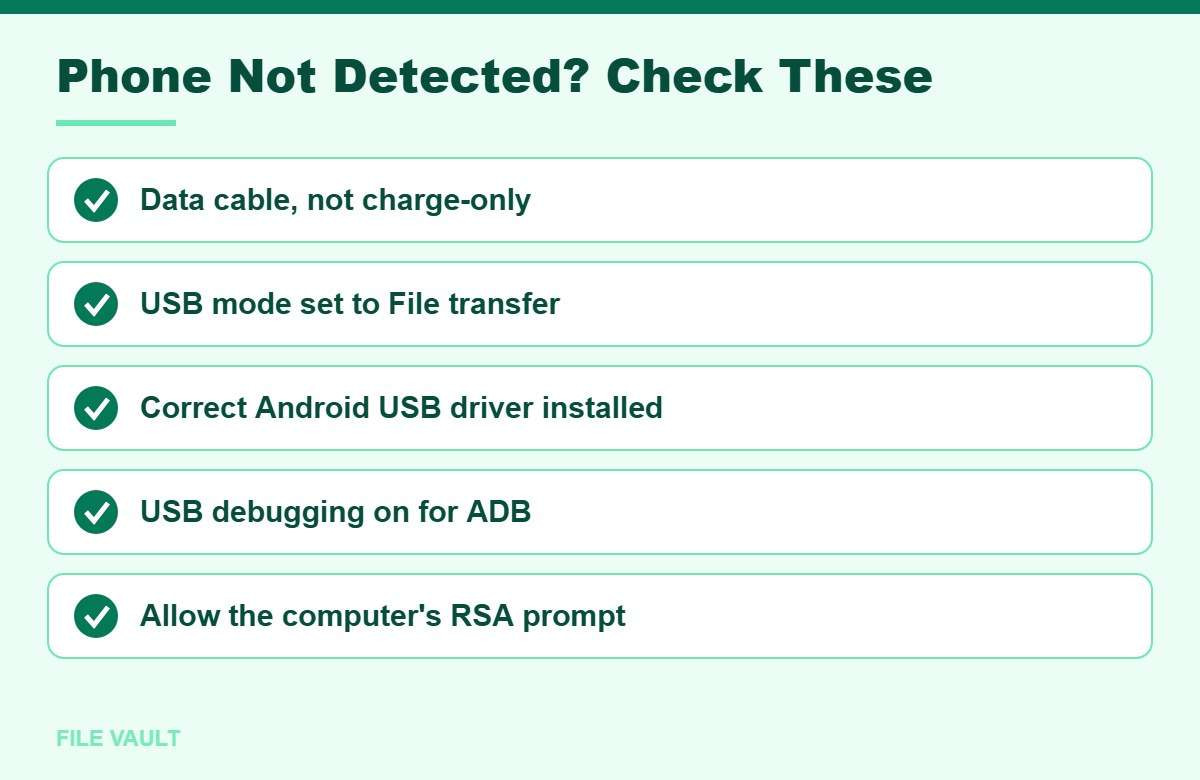
Bonus PDF: Phone Not Detected? Troubleshooter
Work down the list until Windows and ADB see your Android phone. To download it, try one free sponsored app from the list you will see (usually a couple of minutes). Everything in this guide stays free without it.
Frequently Asked Questions
Do I need an Android USB driver to transfer photos?
Usually not. Windows 10 and 11 include a built-in MTP driver for file transfer. A dedicated Android USB driver matters mainly for USB debugging, ADB and manufacturer tools.
Which Android USB driver should I install for a Samsung phone?
Install the Samsung Android USB Driver for Windows from Samsung’s developer website. The Google USB Driver is intended for Pixel and some other Google-supported devices.
Do Mac or Linux computers need an Android USB driver?
No. macOS and Linux recognise Android devices for ADB without a separate driver, although Linux may need udev rules so a normal user account can access the phone.
Why does adb devices show unauthorized?
The phone has not approved the computer yet. Unlock the phone, reconnect the cable, and tap Allow on the USB debugging prompt. Tick Always allow from this computer if it is your own PC.
Is it safe to download Android USB drivers from driver websites?
Use Google’s developer site or your phone maker’s official support site. Third-party driver download sites often bundle adware or outdated drivers.
Getting an Android phone recognised on Windows usually takes three things: a proper data cable, the right USB mode on the phone, and the correct Android USB driver from Google or your phone’s manufacturer. Add USB debugging and approve the computer’s prompt, and ADB, fastboot and file transfers will all work reliably.