
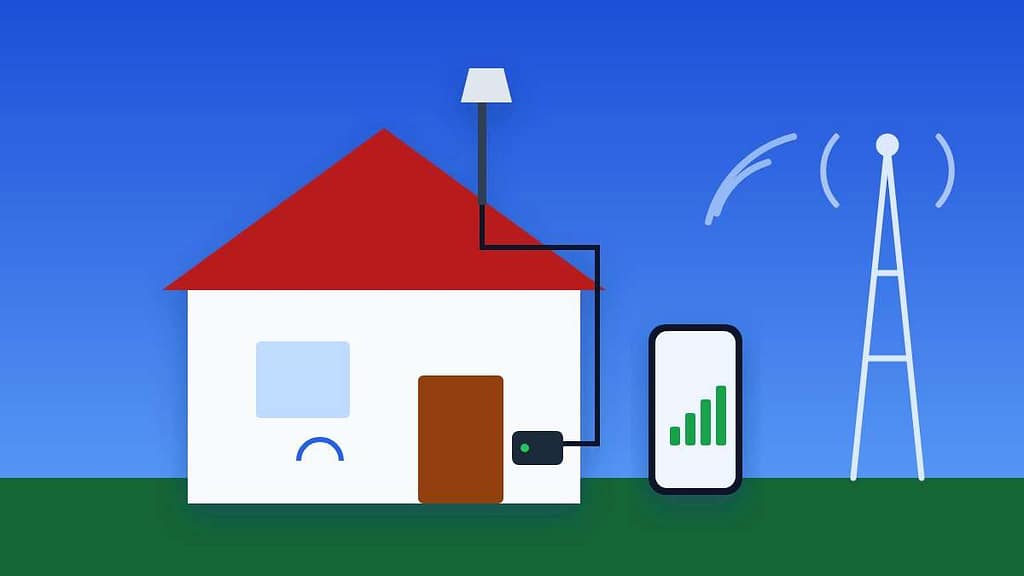
A cell signal booster can turn one bar in a basement office or rural home into reliable calls and usable data. It works by capturing the existing signal outside with one antenna, amplifying it, and rebroadcasting it indoors with a second antenna. Most of the results, though, come from where you place those antennas, not from the booster itself.
This guide walks you through a home cell signal booster setup in six steps, explains the FCC registration rule, and shows how to fix the most common problems, including the dreaded oscillation warning.
Table of Contents
- How a Cell Signal Booster Works
- Before You Buy: Is a Booster the Right Fix?
- Step 1: Find the Strongest Signal Outside
- Step 2: Mount the Outside Antenna
- Step 3: Run the Cable Indoors
- Step 4: Place the Inside Antenna Far from the Outside One
- Step 5: Register Your Cell Signal Booster
- Step 6: Power On and Fine-Tune
- Fix Common Cell Signal Booster Problems
- How to Choose the Right Cell Signal Booster
- Cell Signal Booster Safety and Maintenance
- Cell Signal Booster Alternatives Worth Considering
- Frequently Asked Questions
How a Cell Signal Booster Works
Every home cell signal booster kit has the same three parts, connected by coaxial cable.
- Outside antenna (donor antenna): mounted on the roof, an exterior wall or a pole, where the signal is strongest.
- Amplifier: the booster box indoors, which strengthens the signal in both directions.
- Inside antenna (broadcast antenna): spreads the boosted signal through the room or floor where you need it.
Because the booster amplifies what already exists, it cannot create a signal from nothing. If your phone shows “No Service” even outside on the roof, a cell signal booster will not help. In that case, Wi-Fi calling or a carrier’s network extender is a better solution.
Before You Buy: Is a Booster the Right Fix?
Weak indoor signal has several possible causes, and a cell signal booster only solves some of them.
| Situation | Best solution |
|---|---|
| Decent signal outside, weak indoors (metal roof, brick, basement) | Cell signal booster |
| Good home internet, weak signal everywhere | Wi-Fi calling on your phone |
| No signal at all, even outside | Wi-Fi calling, network extender or a different carrier |
| Weak signal only in your car or RV | A vehicle booster rather than a home model |
| Slow data but full bars | Network congestion; a booster will not fix this |
If you are considering switching carriers instead, trying another network first is cheaper. Our guide to the T-Mobile free trial explains how to test a different network on your own phone.
Step 1: Find the Strongest Signal Outside
The outside antenna should point at the best available signal, so start by measuring. Bars are not precise enough; use your phone’s actual signal reading in dBm.
- iPhone: iPhones do not show dBm in Settings. Use a third-party signal app or Field Test Mode by dialing
*3001#12345#*; the exact screens vary by iOS version. - Android: open Settings > About phone > SIM status (on Samsung, Settings > About phone > Status information > SIM card status) and look for signal strength in dBm.
Readings closer to zero are stronger. Around -70 dBm is excellent, -90 dBm is fair, and anything below -110 dBm is very weak. Walk around the outside of your home and, if it is safe, check the roof line. Note the side of the house with the best reading.
Step 2: Mount the Outside Antenna
- Go as high as you safely can. A pole on the roof or a gable wall usually beats a ground-level spot.
- Point directional antennas toward the nearest tower on the side where you measured the best signal. Omnidirectional antennas do not need aiming.
- Keep it away from metal such as gutters, vents and satellite dishes, which can reflect and weaken the signal.
- Secure the mount firmly with the included hardware. Wind moves loosely mounted antennas and changes the aim.
Roof work is dangerous. If you are not comfortable on a ladder, many booster brands and local installers offer professional installation.
Step 3: Run the Cable Indoors
- Route the coaxial cable from the outside antenna to where the booster will sit indoors, often an attic, closet or utility area near an outlet.
- Enter the house through an existing opening, a window entry cable, or a small drilled hole sealed with weatherproof sealant.
- Avoid sharp bends and do not crush the cable in windows or doors.
- Use the cable length supplied. Every extra metre of cable loses a little signal.

Step 4: Place the Inside Antenna Far from the Outside One
This is the step that decides whether your cell signal booster performs well. If the inside antenna is too close to the outside antenna, the boosted signal leaks back into the donor antenna and creates a feedback loop called oscillation. The booster then reduces its power or shuts down to protect the network.
- Separate them vertically. Manufacturers commonly recommend around 20 feet (6 metres) of vertical separation, such as an antenna on the roof and the booster in a ground-floor room.
- Or separate them horizontally. Horizontal separation usually needs to be larger, often 50 feet (15 metres) or more.
- Point them away from each other. Directional outside antennas should face the tower, away from the inside antenna.
- Use walls and floors as shields. A floor or exterior wall between the antennas helps.
Check your kit’s manual for the exact separation, since it depends on the booster’s gain.
Choosing a spot for the inside antenna
- Place it in the room where you use your phone most, such as a home office or living room.
- Panel antennas on a ceiling or wall cover a wider area; dome antennas on a ceiling spread signal in all directions.
- Keep it at least a metre or two from where you sit, since coverage is strongest close to the antenna but it needs space to spread.
Step 5: Register Your Cell Signal Booster
This step is required by law in the United States. According to the FCC’s page on consumer signal boosters, you need approval from your wireless provider and must register the booster with your provider before turning it on.
- Look for the FCC label. Consumer boosters sold after March 1, 2014 carry a label reminding you to register. AT&T, T-Mobile and Verizon have approved boosters that carry this label.
- Register online with your carrier. Registration is free. Providers collect your name, the booster’s make, model and serial number, its location and the date you start using it.
- Register with each carrier in the household if family members use different networks.
If a carrier or the FCC ever asks you to turn a booster off because it is causing interference, you must switch it off until the problem is resolved.
Step 6: Power On and Fine-Tune
- Connect the cables to the booster, then plug in the power supply last.
- Watch the indicator lights. Green usually means normal operation; orange or red means reduced power or a problem.
- Test your phone in the target room: make a call, run a speed test, and check the dBm reading.
- If a light shows a warning, increase antenna separation or adjust the gain dial if your cell signal booster has one.
- For directional antennas, rotate the outside antenna a few degrees at a time and retest to find the best position.
Allow a minute or two after each change, as phones take time to reconnect to the stronger signal.
Keep notes as you test. Write down the dBm reading in each important room before and after installing the cell signal booster, along with the light status. These notes make it easy to see which antenna position works best, and they are useful if you ever contact the manufacturer’s support team for help.
Fix Common Cell Signal Booster Problems
| Symptom | Likely cause | Fix |
|---|---|---|
| Orange or red light, little improvement | Oscillation from antennas too close | Increase vertical or horizontal separation; add a wall between them. |
| Warning light that says overload | Outside signal too strong for the gain | Turn down gain or aim the outside antenna slightly away from the tower. |
| Better bars but slow data | Tower congestion or unsupported band | Check the booster supports your carrier’s bands; try another carrier’s signal. |
| Coverage only near the inside antenna | Weak donor signal | Move the outside antenna higher or use a more directional antenna. |
| Worked before, stopped suddenly | Loose connector, water ingress or power issue | Check connectors, weatherproof outdoor joints and restart the booster. |
Choosing a Booster for Your Home?
The right cell signal booster depends on how weak the outside signal is and how much indoor space you need to cover. Compare coverage ratings and make sure the model is FCC certified for consumer use.
How to Choose the Right Cell Signal Booster
Booster boxes list a lot of numbers. These are the ones that actually matter when you compare models for a home.
- Gain (dB): how much the cell signal booster amplifies. FCC consumer home boosters top out at around 72 dB for wideband models. Higher gain helps in very weak areas and large homes.
- Coverage area: advertised square footage assumes a decent outside signal. With a weak outside signal, expect a fraction of the number on the box.
- Supported bands: check that the cell signal booster covers the bands your carrier uses in your area, including low-band 5G if you rely on it.
- Antenna type: directional outside antennas pull in a distant tower better; omnidirectional antennas are simpler and suit areas with towers in several directions.
- Multi-carrier support: choose a multi-carrier model if people in your home use different networks.
- FCC certification and warranty: buy only certified consumer boosters, and prefer brands with multi-year warranties and support.
Home, office or vehicle?
A home cell signal booster is designed for a fixed location and uses a larger outside antenna. Vehicle and RV boosters use smaller antennas and lower gain limits because the antennas sit close together. A home model will not work well in a car, and a vehicle model covers only a small area indoors, so buy for the place you need coverage most.
Cell Signal Booster Safety and Maintenance
- Weatherproof outdoor connections with the tape or boots supplied, and check them after storms.
- Ground the outside antenna mast if local electrical codes require it, especially on tall poles.
- Keep the amplifier ventilated. Do not bury the cell signal booster under insulation or in a sealed box, as it produces heat.
- Re-register if you move. Your registration includes the booster’s location, so update it with your carrier after a move.
Cell Signal Booster Alternatives Worth Considering
- Wi-Fi calling: free on most phones and carriers. Turn it on in your phone’s call settings. It needs a good home internet connection.
- 5G home internet as a backup: if your area has good signal from another carrier, their home internet can also provide Wi-Fi calling coverage.
- Carrier network extenders: some carriers offer small-cell devices that connect to your broadband and create a private cell signal. Availability varies.
- Switching carriers: a different network may simply be stronger where you live. If you plan to move, our guide on how to carrier unlock your Android phone explains how to take your phone with you.
Bonus PDF: Signal Booster Placement Worksheet
Measure, place, register and record your results. To download it, try one free sponsored app from the list you will see (usually a couple of minutes). Everything in this guide stays free without it.
Frequently Asked Questions
Do I have to register a cell signal booster?
Yes. FCC rules require you to register a consumer booster with your wireless provider before using it. Major US carriers offer free online registration and have approved properly certified boosters.
Will a cell signal booster work with no signal at all?
No. A booster amplifies an existing signal. If there is no usable signal even on the roof, a booster cannot help; Wi-Fi calling or a carrier network extender is a better option.
Does a booster improve 5G?
Many boosters improve 4G LTE and low-band 5G that share the same frequencies. High-frequency 5G bands are usually not boosted, so check the model’s supported bands.
Why did my booster’s lights turn red or orange?
Most boosters reduce power or shut down when antennas are too close together, causing oscillation, or when the outside signal is too strong. Increase the distance between antennas or adjust the gain.
Do boosters work for all carriers at once?
Most consumer home boosters are multi-carrier and amplify the bands used by AT&T, T-Mobile and Verizon simultaneously. Some single-carrier models offer higher gain for one network.
A successful cell signal booster setup comes down to three things: mount the outside antenna where the signal is strongest, keep plenty of distance between the two antennas, and register the booster with your carrier before switching it on. Get those right, and weak indoor signal becomes clear calls and dependable data.